The Uttar Pradesh Police Recruitment & Promotion Board (UPPBPB) has released the Exam City Slip for the UP Police Constable Recruitment 2025 (Advertisement No. 07/2025) on 01 June 2026. While the full Admit Card / Hall Ticket is expected to be released a few days before the exam, candidates can already download their Exam City Slip from the official website uppbpb.gov.in to know their allotted exam centre city.
The written examination is scheduled for 08, 09, and 10 June 2026 across multiple shifts. With over 32,679 vacancies at stake, this is one of the most competitive state police recruitments in India.
Downloading the Exam City Slip — and the Admit Card as soon as it releases — is critically important because entry to the examination hall is strictly not permitted without a valid hall ticket. Candidates must also match their personal details printed on the admit card with their original documents well in advance so that any errors can be corrected before exam day.
Contents
UP Police Constable Admit Card 2026
| Exam Name | UP Police Constable Written Examination 2025 |
| Conducting Body | UP Police Recruitment & Promotion Board (UPPBPB) |
| Advertisement No. | 07/2025 |
| Total Posts | 32,679 |
| Exam City Slip Status | Released (01 June 2026) |
| Admit Card Status | Expected Shortly Before Exam Date |
| Exam Date | 08, 09 and 10 June 2026 |
| Official Download Link | uppbpb.gov.in |
How to Download UP Police Constable Admit Card 2026
Follow these steps carefully to download your UP Police Constable Admit Card 2026:
- Open your browser and go to the official website: uppbpb.gov.in. On the homepage you will see a top navigation menu with tabs like ‘Home’, ‘Recruitment’, ‘Admit Card’, ‘Results’, and ‘Notices’.
- Click on the ‘Admit Card’ tab in the top navigation bar. A dropdown list will appear showing the latest admit card links for different recruitments.
- Look for the link labelled ‘Constable Recruitment 2025 – Admit Card / Hall Ticket’ (Advertisement No. 07/2025) and click on it. You will be redirected to the candidate login page.
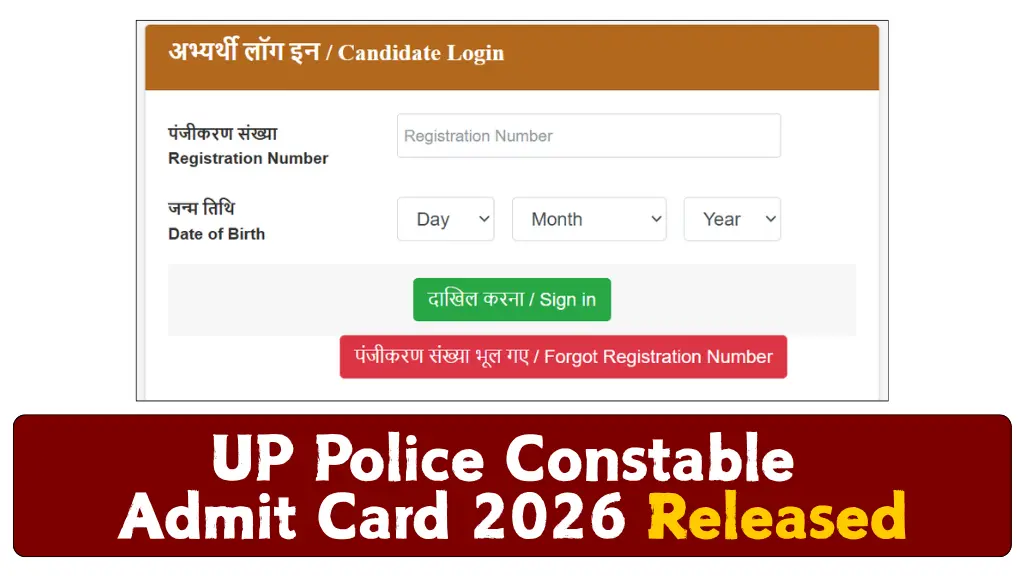
- On the login page, you will see two input fields: ‘Registration Number’ and ‘Date of Birth’ (or ‘Password’). Enter your 12-digit registration number exactly as it was issued at the time of form submission.
- Enter your Date of Birth in DD/MM/YYYY format in the second field, OR enter your password if applicable. Double-check both entries before proceeding.
- Click the ‘Submit’ or ‘Login’ button. The system will validate your credentials and display your candidate dashboard.
- On the candidate dashboard, you will see a link or button labelled ‘Download Admit Card’ or ‘Print Hall Ticket’. Click on it.
- A PDF file containing your admit card will open in a new tab or begin downloading automatically. Verify that all details — name, roll number, exam date, and exam centre — are correct.
- Click the print icon or press Ctrl+P to print the admit card. Use A4-size paper and ensure the printout is clear and not blurry. Take at least 2–3 printed copies.
- Save the PDF to a secure location on your phone or computer as a backup in case the printout is lost.
What to Do If You Forget Your Registration Number or Password:
- If you forgot your Registration Number: Visit the official website and look for a ‘Forgot Registration Number’ link on the login page. You may be able to retrieve it by entering your mobile number or email ID registered at the time of application.
- If you forgot your Password: Click on ‘Forgot Password’ on the login page. You will receive an OTP on your registered mobile number or email. Enter the OTP and reset your password.
- If both are unavailable: Contact the UPPBPB helpdesk immediately with your application details (name, father’s name, category, date of birth). Keep your application fee receipt handy as proof of registration.
Details Mentioned on the Admit Card
The UP Police Constable Admit Card 2026 will contain the following details. Verify each one carefully — errors in exam centre or roll number can cause serious problems on exam day:
- Candidate’s Full Name — Verify it matches your government-issued ID exactly.
- Father’s / Mother’s Name
- Roll Number — MOST IMPORTANT: Required for entry at the exam gate and for checking results.
- Registration Number
- Category (General / OBC / SC / ST / EWS)
- Date of Birth
- Gender
- Exam Date and Shift Timing — Verify this matches your schedule and plan your travel accordingly.
- Exam Centre Name and Full Address — MOST IMPORTANT: Locate it on Google Maps the day before.
- Candidate’s Photograph and Signature — If these are blurry or incorrect, request correction immediately.
- Exam Instructions and Important Rules — Read thoroughly; violations can lead to disqualification.
- Reporting Time — Usually 30–60 minutes before the exam; late entry may be refused.
Documents to Carry to the Exam Centre
Carrying the right documents is mandatory. Here is what to bring and why:
- Printed Admit Card (2 copies) — The primary entry pass without which you will not be allowed inside the exam hall. Invigilators will collect one copy.
- Original Government-issued Photo ID — A valid Aadhaar Card, Voter ID, PAN Card, Passport, or Driving Licence is needed to verify your identity on-site. Photocopies are NOT accepted.
- Photocopy of the Photo ID — Some exam centres require you to submit a self-attested photocopy along with the original for record-keeping.
- Passport-size Photographs (2–4 copies, recent) — You may be asked to paste a photograph on the attendance sheet. Use the same photograph that was uploaded in your application form.
- Category Certificate (if applicable) — Candidates belonging to SC/ST/OBC/EWS must carry original caste/income certificates for spot verification if asked by authorities.
- PwD Certificate (if applicable) — Candidates with disabilities must carry the original disability certificate to avail of applicable provisions like extra time or scribe facility.
What to Do If Your Admit Card Has an Error
Most recruitment websites skip this section — but errors on admit cards are more common than you think. Here is exactly what to do:
- Identify the Error: Note down the specific incorrect detail (e.g., wrong name spelling, incorrect photo, wrong date of birth, wrong gender, wrong category).
- Do NOT Panic: Many errors are correctable before the exam. Act quickly and stay calm.
- Visit the Official Website Immediately: Go to uppbpb.gov.in and look for an ‘Objection / Correction’ portal, candidate helpdesk link, or a grievance redressal section.
- Send a Written Complaint: If no online portal is available, draft a complaint email to the official UPPBPB email ID. Clearly mention: (a) Your full name, (b) Registration number, (c) The exact error, (d) What the correct information should be. Attach supporting proof (e.g., Aadhaar, certificate).
- Call the UPPBPB Helpline: Visit the ‘Contact Us’ page on uppbpb.gov.in to find the official helpline number. Note your complaint reference number.
- Visit the Board Office If Necessary: For critical errors (like wrong name or photograph) that cannot be resolved online, you may need to visit the UPPBPB office in Lucknow with original documents.
- Carry Supporting Proof to the Exam Centre: Even if the correction is not made in time, carry original documents that prove the correct information. Inform the invigilator at the exam centre — they may allow you entry with verification.
Important: Errors in roll number, exam centre, or exam date are the most critical. Report these on priority.
Exam Day Guidelines and Rules
Reporting Time:
Candidates must report to the exam centre at least 30–45 minutes before the exam start time. The exact reporting time is printed on your admit card. The gates are typically closed 15 minutes before the exam begins — do not be late.
Prohibited Items:
- Mobile phones, smartwatches, Bluetooth devices, and any electronic gadgets
- Calculator, books, notebooks, or printed material
- Wallet/purse with metallic clasps (leave non-essential items at home)
- Eatables (unless medically required with a doctor’s certificate)
- Whitener, extra pens beyond what is permitted
Dress Code:
There is no strict dress code for the written exam, but candidates are advised to wear comfortable, formal attire. Avoid wearing clothes with large buttons or metallic accessories that may trigger metal detectors.
Biometric / Identity Verification:
UPPBPB may conduct biometric verification (fingerprint/photograph) at the exam centre. Ensure your fingers are clean and dry. Do not apply mehndi or paint that could obstruct fingerprint scanning.
Do’s and Don’ts:
DO’S:
✔ Carry printed admit card + original photo ID
✔ Reach the exam centre at least 30 minutes before reporting time
✔ Read all exam instructions printed on the admit card
✔ Carry a transparent water bottle and any required medicine
✔ Cooperate fully with biometric and security checks
DON’TS:
✘ Do NOT carry a mobile phone inside the exam hall
✘ Do NOT attempt to communicate with other candidates
✘ Do NOT arrive late — late entry is generally not permitted
✘ Do NOT write anything on the question paper if instructed otherwise
✘ Do NOT leave the exam hall before the permitted time
Exam Centre Tips
Here are 5 practical tips to make your exam day smooth and stress-free:
- Locate Your Exam Centre the Day Before: Do not rely on Google Maps alone on exam day. Take a trial run to your exam centre on 07 June 2026 — know the exact route, distance, and travel time. This will save you from panic on the actual day.
- Reach Early — At Least 30 Minutes Before Gates Close: Aim to arrive at least 30–45 minutes before the official reporting time. Security checks, biometric queues, and seating can take longer than expected, especially at large venues.
- Carry a Transparent Water Bottle and Light Snack: Exams can be 2–3 hours long and exam centres may be hot in June. Keep yourself hydrated. Carry a light snack (biscuits or dry fruit) in case you feel low on energy before the exam.
- Keep Your Belongings Minimal: Leave your mobile phone, extra cash, and jewellery at home. Only carry what is permitted. This speeds up security checks and reduces the risk of losing valuables.
- Stay Calm and Sleep Well the Night Before: Avoid last-minute cramming on the night of 07 June. A good night’s sleep (7–8 hours) will improve your concentration and recall far more than a few extra hours of revision.
Important Links
| Download Admit Card / Exam City Slip | Click Here To Download Exam City Slip |
| Official Website | https://uppbpb.gov.in/ |
Frequently Asked Questions (FAQs)
Yes, you can download the UP Police Constable Admit Card 2026 on your mobile phone. Open uppbpb.gov.in in your phone’s browser (Chrome or Safari), log in with your registration number and date of birth, and download the PDF
Do not worry — you can re-download and re-print the admit card from uppbpb.gov.in as many times as needed before the admit card link is deactivated.
No — the admit card alone is NOT sufficient. You must carry a valid original government-issued photo ID (Aadhaar Card, Voter ID, PAN Card, Driving Licence, or Passport) alongside the printed admit card.
Contact the UPPBPB helpdesk immediately through the official website (uppbpb.gov.in) and raise a grievance. Attach scanned copies of the correct documents
The UP Police Constable Exam City Slip 2026 has been released on 01 June 2026, and the much-awaited Written Examination is scheduled for 08, 09, and 10 June 2026. With 32,679 vacancies up for grabs, this exam is a golden opportunity for thousands of aspirants across Uttar Pradesh.
Candidates must download their Exam City Slip immediately and keep checking the official website uppbpb.gov.in for the release of the full Admit Card. Once available, print at least 2–3 copies, verify all personal details, and read the exam instructions carefully.
Prepare well, stay calm, and follow all guidelines on exam day. We wish all UP Police Constable aspirants the very best!